
# frp GUI美化
ttkbootstrap 是一个基于 tkinter 的界面美化库
只需要在原有的代码上稍作修改就行,在ttkbootstrap (opens new window)的官网有详细的教程
修改后效果是这样的:
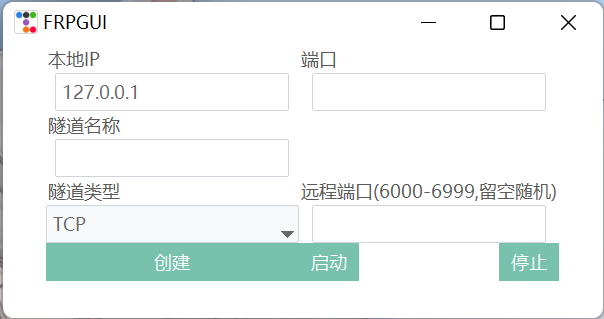
添加了自定义远程端口的配置(如果像之前那样在代码中规定端口,那岂不是要每个人分别发一个客户端!)
虽然大体格式还是一样,但是样式好看很多了
接下来就是非常痛苦的美化过程了,一个像素一个像素的去扣
你永远不知道下次一次运行会变成什么鬼样子
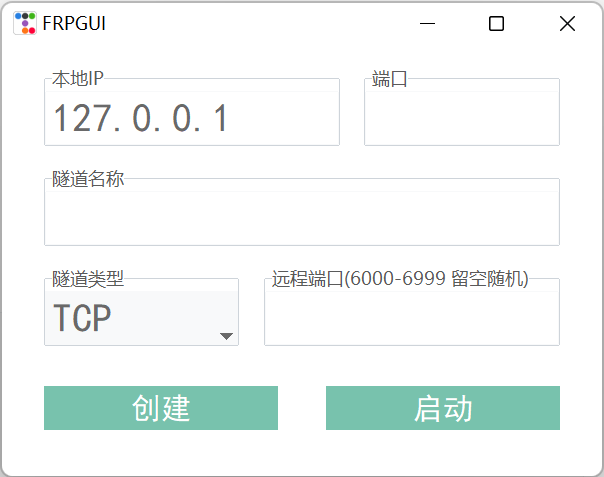
总之……经过多天的努力,下面是最终版:
源码:
import os
import time
import random
import ttkbootstrap as ttk
from ttkbootstrap.constants import *
from tkinter import messagebox


class Application(ttk.Frame):
    def __init__(self, master=None):
        super().__init__(master)
        self.master = master
        self.pack()
        self.createWidget()

    def createWidget(self):
        # 输入ip
        self.labelIp = ttk.LabelFrame(self, text="本地IP")
        self.labelIp.grid(row=0, column=0, sticky=W, pady=20)
        self.ip = ttk.StringVar()
        self.entryIp = ttk.Entry(self.labelIp, textvariable=self.ip, width=14, font=("黑体", 20), bootstyle="light")
        self.entryIp.pack()
        self.ip.set("127.0.0.1")

        # 输入端口
        self.labelPort = ttk.LabelFrame(self, text="端口")
        self.labelPort.grid(row=0, column=0, sticky=E, pady=20)
        self.port = ttk.StringVar()
        self.entryPort = ttk.Entry(self.labelPort, textvariable=self.port, width=9, font=("黑体", 20), bootstyle="light")
        self.entryPort.pack()

        # 隧道名称
        self.labelName = ttk.LabelFrame(self, text="隧道名称(只能为字母、数字和下划线)")
        self.labelName.grid(row=1, column=0, sticky=E)
        self.name = ttk.StringVar()
        self.entryName = ttk.Entry(self.labelName, textvariable=self.name, width=25, font=("黑体", 20), bootstyle="light")
        self.entryName.pack()

        # 隧道类型
        self.labeltyp = ttk.LabelFrame(self, text="隧道类型")
        self.labeltyp.grid(row=2, column=0, sticky=W, pady=20)
        self.typ = ttk.StringVar()
        self.typ.set("TCP")
        self.om01 = ttk.Combobox(self.labeltyp, textvariable=self.typ, value=("TCP", "UDP"),
                                 width=8, font=("黑体", 20), state="readonly", bootstyle="light")
        self.om01.pack()

        # 远程端口
        self.labelRemote = ttk.LabelFrame(self, text="远程端口(6000-6999 留空随机)")
        self.labelRemote.grid(row=2, column=0,  sticky=E, pady=20)
        self.remote = ttk.StringVar()
        self.entryRemote = ttk.Entry(self.labelRemote, textvariable=self.remote, width=14, font=("黑体", 20), bootstyle="light")
        self.entryRemote.pack()

        s = ttk.Style()
        s.configure('my.TButton', font=("黑体", 15))
        self.btn01 = ttk.Button(self, width=14, text="创建", style='my.TButton', command=self.establish)
        self.btn01.grid(row=3, column=0, sticky=W, pady=20)
        self.btn02 = ttk.Button(self, width=14, text="启动", style='my.TButton', command=self.run)
        self.btn02.grid(row=3, column=0, sticky=E, pady=20)


    def establish(self):
        if self.typ.get() == "TCP":
            typ = "tcp"
        if self.typ.get() == "UDP":
            typ = "udp"
        if self.remote.get() == "":
            self.remote.set(random.randint(6000, 6999))  # 随机数生成,服务器的端口我只开放了这个范围,应该够了
        with open("frpc.ini", "w") as f:
            list = ['[common]\n',
                    'server_addr = 这里是服务器地址\n',
                    'server_port = 7000\n',
                    'log_file = ./frpc.log\n',
                    'token = FrpJtks51zjscs\n'
                    '\n',
                    '[' + self.name.get() + ']\n',
                    'type = ' + typ + '\n',
                    'local_ip = ' + self.ip.get() + '\n',
                    'local_port = ' + self.port.get() + '\n',
                    'remote_port = ' + self.remote.get()]
            f.writelines(list)

    def run(self):
        os.popen('frpc.exe')
        time.sleep(0.5)  # 睡眠0.5秒
        with open("frpc.log", "r") as f:
            self.log = str(f.readlines()[-3:])
            if "[W]" in self.log:
                os.popen('taskkill /F /IM frpc.exe')
                if "port already" in self.log:
                    messagebox.showerror("启动失败", "远程端口已被使用,请改用其他端口")
                elif "proxy name" in self.log:
                    messagebox.showerror("启动失败", "隧道名称" + self.name.get() + "已被使用,请检查并更换一个隧道名称")
                else:
                    messagebox.showerror("启动失败", "出现了没有预料的错误,请检查日志文件frpc.log,联系小叶子")
            else:
                messagebox.showinfo("启动成功", "您的本地地址:" + self.ip.get() + ":" + self.port.get() +
                                    "已映射到服务器地址:[这里是服务器地址]:" + self.remote.get())
        self.btn02 = ttk.Button(self, width=14, text="停止", style='my.TButton', command=self.end)
        self.btn02.grid(row=3, column=0, sticky=E, pady=20)

    def end(self):
        os.popen('taskkill /F /IM frpc.exe')
        self.btn02 = ttk.Button(self, width=14, text="启动", style='my.TButton', command=self.run)
        self.btn02.grid(row=3, column=0, sticky=E, pady=20)


if __name__ == '__main__':
    root = ttk.Window(themename="minty")
    root.geometry("600x430+600+250")
    root.title("FRPGUI")
    app = Application(master=root)


    def end():
        os.popen('taskkill /F /IM frpc.exe')
        root.destroy()


    root.protocol('WM_DELETE_WINDOW', end)
    root.mainloop()
别看好像变化不大,我扣了好久啊!
启动按钮改成了点击后变为停止按钮,防止有呆瓜重复启动
GUI整体变大了一号,多套了一层 div Frame,方便位置的控制
但是让人非常不理解的是,ttk的组件不能用height设置高度,导致按钮比我预期的要矮一点
此外我还写过一版深色主题的,布局稍有变化:
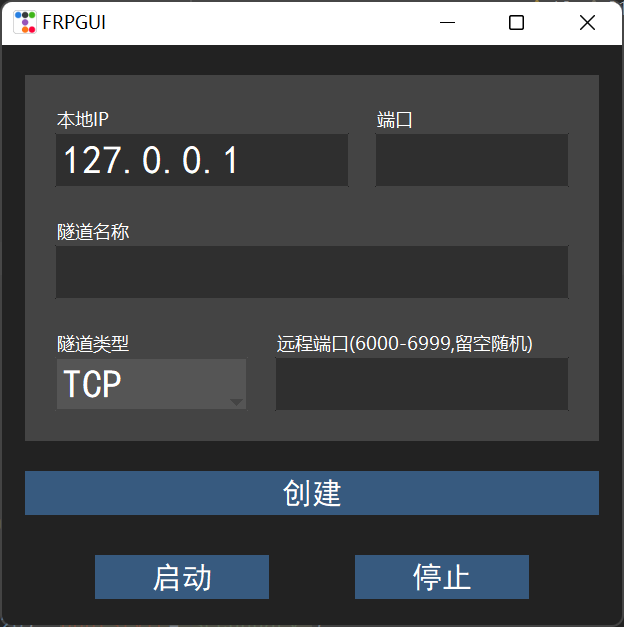
但感觉不太好看,所以选择了浅色的
也有考虑过将这个作为黑夜模式加入
但是二者的布局相差有点大,再就是我技术力还不够,也就搁置了(说白了就是懒)